With Lingopie, you can learn 17 languages, including Spanish, French, Italian, Portuguese, German, Russian, Japanese, Chinese, Korean, Dutch, Turkish, Greek, Polish, Hebrew, Norwegian, Swedish and English. Awesome, right!?
Below, you’ll find all the current interface and learning language combinations available on Lingopie.
| Interface Language | You Can Learn |
|---|---|
| English | Chinese, Dutch, French, German, Greek, Hebrew, Italian, Japanese, Korean, Polish, Portuguese, Norwegian, Russian, Spanish, Swedish,Turkish, English. |
| French | Dutch, English, French, German, Greek, Italian, Russian, Spanish, Turkish |
| Spanish | Dutch, English, French, German, Greek, Italian, Korean, Portuguese, Russian |
| Italian | Dutch, English, French, German, Portuguese, Spanish, Turkish |
| Portuguese | Dutch, English, French, German, Italian, Korean, Polish, Russian, Spanish, Turkish |
| German | Dutch, English, French, Greek, Italian, Polish, Portuguese, Spanish |
| Greek | Dutch, English, French, German, Italian, Korean, Portuguese, Spanish, Turkish |
| Japanese | English, Spanish |
| Korean | English, Spanish, French |
| Russian | English, Italian, Spanish, French |
Coming soon: Welsh
Do you want to learn English?
You can start learning English on Lingopie by choosing Spanish, Portuguese, Italian, French, Greek, Portuguese, Japanese, Korean, Russian or German as your interface language.
Want to improve your English?
You can now learn English with Lingopie by selecting English as your interface language and English as your learning language
What’s different?
- English-only subtitles: You’ll see one line of English subtitles, without translation.
- Learn words in context: Click any word to see its definition, synonyms, and examples of how it’s used in different contexts.
- Two learning games: You’ll have access to two games adapted specifically for English learners without translations.
Where is it available?
This feature is currently available on web only. Support for other platforms will be introduced soon.
How do you change the learning language?
When you start your free trial or subscription, you can access all the shows in every language. To change your learning language:
On desktop (web):
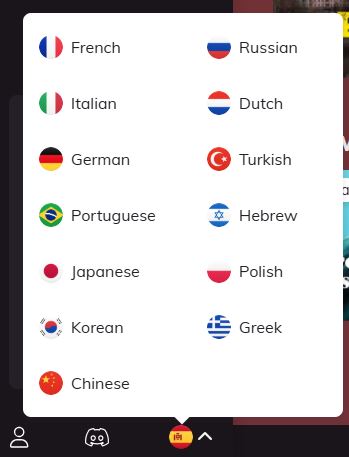
- Click the Language Selector in the bottom left corner, located under the flag icon.
- Choose the language you want to learn.
On mobile app (iOS & Android):
- Tap Account in the bottom right corner.
- Select Learning language.
- Under And I want to learn [language], choose the language you want to learn.
- Tap Select to confirm.
After selecting a new language, your catalog, content, and available features will update to match the language you’ve chosen to learn.
How do I change the interface language?
On desktop (web):
- Go to your Profile Settings or visit lingopie.com/profile.
- Select your preferred interface language:

On mobile app (iOS & Android):
- Tap Account in the bottom right corner.
- Select Learning language.
- Under I speak [language], choose the preferred interface language.
We’re constantly working to add more languages and language combinations! You can find updates about newly added languages and other features in the “The Latest and Greatest” section, located under the notification bell in the upper-right corner of your screen. If you have suggestions, we’d love to hear from you — just reach out at support@lingopie.com
Was this article helpful?
That’s Great!
Thank you for your feedback
Sorry! We couldn't be helpful
Thank you for your feedback
Feedback sent
We appreciate your effort and will try to fix the article