The Family Plan lets you share your Lingopie subscription with up to 3 additional members, for a total of 4 users, including the main account holder.
Activate the Family Plan
The Family Plan is available only with an active Lingopie subscription and must be activated by our support team.
- Subscribe to a any Lingopie plan.
- Contact our support team to request activation of the Family Plan and receive pricing details.
- Once activated, you’ll be able to invite family members from your account settings.
Add Friends and Family to Your Plan
After the Family Plan is activated, you can invite members in two different ways.
Option 1: Invite from Settings
- Go to Settings.
- Under the Plan section, click Invite your friends & family.

- Choose how to invite:
- Share an invitation link, or
- Send invitations by email.
Option 2: Invite from the account menu (bottom-left corner)
- Click Add family members.
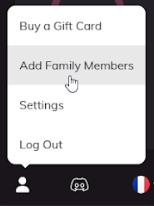
- A pop-up window will appear.
- Enter up to 3 email addresses to send invitations.
FAQ / Troubleshooting
How many members can I add to the Family Plan?
You can add up to 3 family members, for a total of 4 users, including the main account holder.
Can Family Plan members book lessons?
Yes. Family Plan members can book both group lessons and private lessons, just like individual subscribers.
Is the Family Plan available for the Lifetime subscription?
No. The Family Plan is only available with the annual subscription and is not supported on Lifetime plans.
Didn’t receive the invite email?
Check your spam or junk folder. If needed, resend the invitation from your Family Plan settings.
Link expired?
You can generate a new invitation link at any time from your Family Plan settings.
Does a family member already have a Lingopie account?
Contact Lingopie Support, and we’ll help remove the existing profile so the user can join your Family Plan.
How do I remove a member from my Family Plan?
At the moment, there is no self-service option to remove members. Please get in touch with Lingopie Support, and our team will assist you.
Was this article helpful?
That’s Great!
Thank you for your feedback
Sorry! We couldn't be helpful
Thank you for your feedback
Feedback sent
We appreciate your effort and will try to fix the article