Lingopie makes it easy to see which dialect is spoken in each video. If you're looking for a specific version of a language, Lingopie distinguishes this through the dialect of each show. Dialects are tied to the country of origin, helping you understand which variation of a language you’re learning and practice the correct accent and regional vocabulary. A small flag in the top right corner of the video graphic shows the country of origin.
There are two ways to identify the dialect: when browsing videos by country or when watching a specific video.
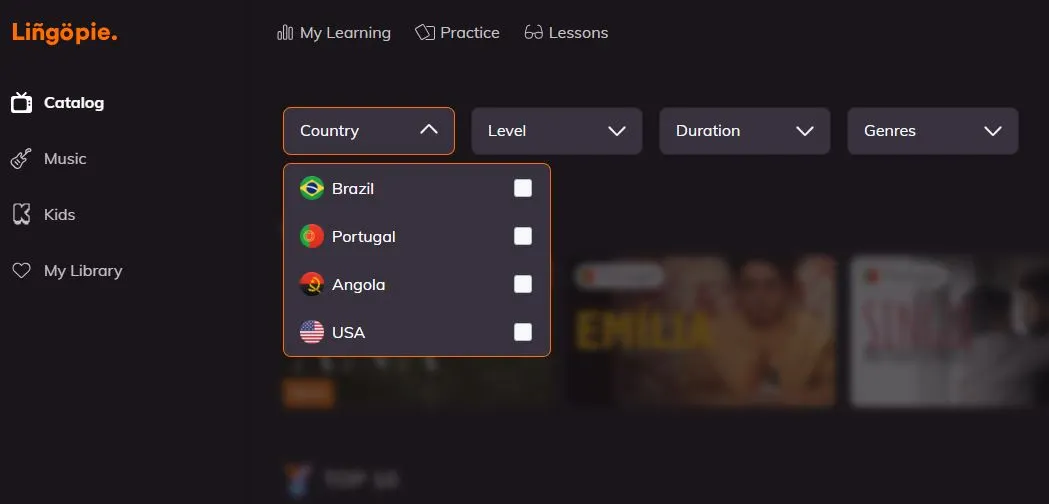
Method 1: From the Country Selection
- Enter Lingopie and select the country option when browsing the catalog.
- Check the country label on each video thumbnail — it indicates the dialect.
- Example: A show produced in Brazil will display a Brazilian flag, showing that the dialect is Brazilian Portuguese.
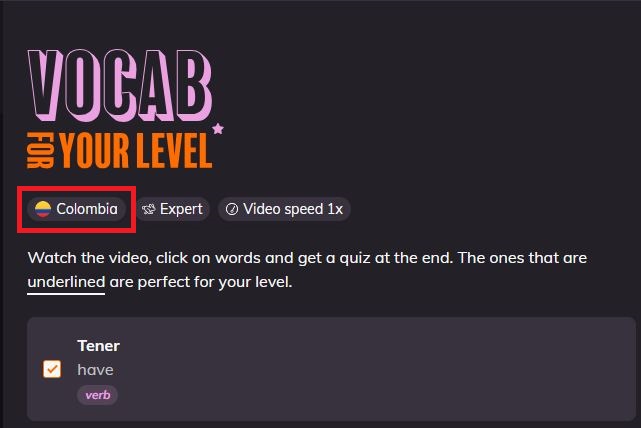
Method 2: While Watching a Video
- Open the video or TV show you want to watch.
- Look at the top right corner of the video graphic.
- Check the flag displayed — it shows the country/dialect of the content.
- Example: A show produced in Colombia with Colombian actors will display a Colombian flag, indicating Colombian Spanish.
- Use this information to focus on the accent and regional expressions.
Why you should pay attention to the dialect
- Boost your listening skills: Hearing the correct accent makes it easier to understand native speakers.
- Pick up regional vocabulary: Each country has its own words and expressions — knowing the dialect ensures you learn them accurately.
- Speak more naturally: Practicing proper pronunciation and accent makes your speech sound more authentic.
- Understand cultural context: Recognizing the dialect helps you catch cultural nuances in the content you watch.
Was this article helpful?
That’s Great!
Thank you for your feedback
Sorry! We couldn't be helpful
Thank you for your feedback
Feedback sent
We appreciate your effort and will try to fix the article