Make learning with Lingopie fun, effective, and interactive by exploring all the features in the bottom-right corner of the video player.

Subtitles in Your Language
- Choose the language for your subtitles to match your learning needs.
Grammar Coach
- Our color-coded Grammar Index makes grammar easy and engaging.
- Hover over, click, or pause a word to see captions highlight in colors representing different parts of speech: nouns, verbs, adjectives, and more.

Listen and Repeat
- Replay videos to improve comprehension and pronunciation.
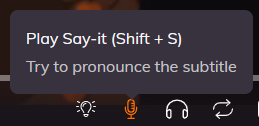
Say It!
- Record yourself repeating video captions.
- Get instant feedback and a score to track your pronunciation.
- Tap a word to practice its pronunciation, or tap the microphone icon to say the full phrase.
Auto-Loop Subtitles
- Practice tricky sentences by automatically replaying them using the auto-loop icon.

Auto-pause
Lingopie allows you to Auto-Pause after each subtitle. This tool is effective as it saves you the energy of pausing all the time; basically, it saves 50% of your clicks, as the only clicks needed are the ones to restart the video. You can restart the episode easily just by clicking anywhere on the video player screen.
How to auto-pause: click on "CC" icon while watching the video and activate "auto-pause" option.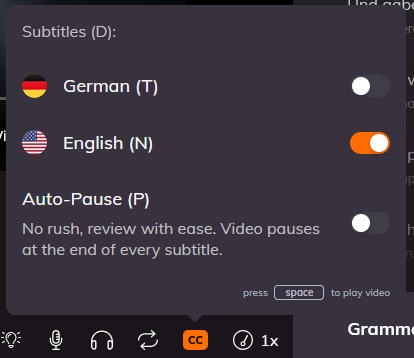
Slow Down Video
- Adjust the playback speed with the slow down button.
- Perfect for catching every word and practicing accurate pronunciation.

Tips & Best Practices
- Combine features: use Say It! with auto-loop to reinforce tricky sentences.
- Start with subtitles in your native language, then switch to the target language for practice.
- Use Grammar Coach colors to focus on parts of speech that challenge you most.
- Slow down videos when learning difficult pronunciation or fast dialogue.
- Repetition is key: replay videos multiple times for better retention.
Was this article helpful?
That’s Great!
Thank you for your feedback
Sorry! We couldn't be helpful
Thank you for your feedback
Feedback sent
We appreciate your effort and will try to fix the article