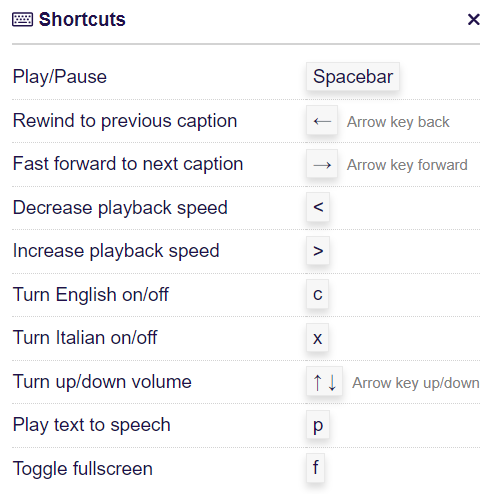
Make your Lingopie experience faster and smoother with keyboard shortcuts. These shortcuts let you control videos, navigate the platform, and access features quickly — all without leaving your keyboard.
Keyboard Shortcuts
Troubleshooting Keyboard Shortcuts
If your keyboard shortcuts aren’t working:
- Make sure the video player is in focus by clicking on it.
- Try refreshing your browser.
- Clear your browser cache or try a different browser.
- Ensure that no browser extensions are blocking keyboard interactions.
Need More Help?
If shortcuts still don’t work, our support team is happy to assist. Contact Lingopie Support and we’ll help you get back on track.
Was this article helpful?
That’s Great!
Thank you for your feedback
Sorry! We couldn't be helpful
Thank you for your feedback
Feedback sent
We appreciate your effort and will try to fix the article